The Benchmark Library reads your whole book
Press e and the estate sheet reads your whole book at once, priced against today's curve. Four more moves ship in the same window. Here is what changes for the buyer, and where it stops.
Here is a problem most procurement teams recognise but rarely name. You benchmark deals one at a time. A renewal lands, you open the line, you check the offer against the curve, you form a position, you save it, and you move on. Six weeks later you have thirty saved positions scattered across the calendar, and no single place tells you which of them still has real money open right now. The curve has moved. Some of those saved asks are stale. The dollars you fought for in March are not the dollars on the table today, and the sheet that priced each line never bothered to add them up. This update closes that gap. The window that benchmarked one line at a time gained a morning view: press e and the estate sheet lists every line your organization has saved a position on, priced against today's curve and ranked by the dollars still open between the offer and the supported ask. We wrote earlier about why you should benchmark the portfolio, not one deal at a time. This is that argument shipped into the window you already use.
The morning view reads the book
Press e for the estate sheet. Every saved position appears as a row, each one repriced against today's curve rather than the curve that was live when you saved it. The rows are ranked by the dollars still open, meaning the distance between the offer on the table and the ask the data supports. A line where the vendor has already come to your number sinks to the bottom. A line where twelve percent of contract value is still sitting unclaimed rises to the top. You read the book the way a portfolio manager reads a position sheet: largest exposure first, everything else in descending order of what it is worth to move.
One press reopens any row as a live deal. You are not exporting to a spreadsheet and losing the linkage. The row you flagged at the top of the list becomes the working benchmark again, with the full percentile detail behind it. This is the same object each way: the summary sheet and the single line are two readings of one record, which is the pattern we described when every vendor benchmark started opening as the verdict reading.

Four more moves in the same window
The estate sheet arrived alongside four smaller moves, all inside the same window, all reachable by a single key. None of them is a new screen you have to learn.
Press b for boardroom mode. The four headline figures render at poster size on the navy stage, sized for the meeting itself rather than the desk. This is the reading you put on the wall when the CFO and the vendor are in the room together and you need one clean surface, not a dense sheet. Press c and the whole verdict lands on your clipboard as a single sentence, ready to paste into an email, a Slack thread, or the note you owe your lead by end of day. No screenshot, no retyping the number, no risk of transposing a digit.
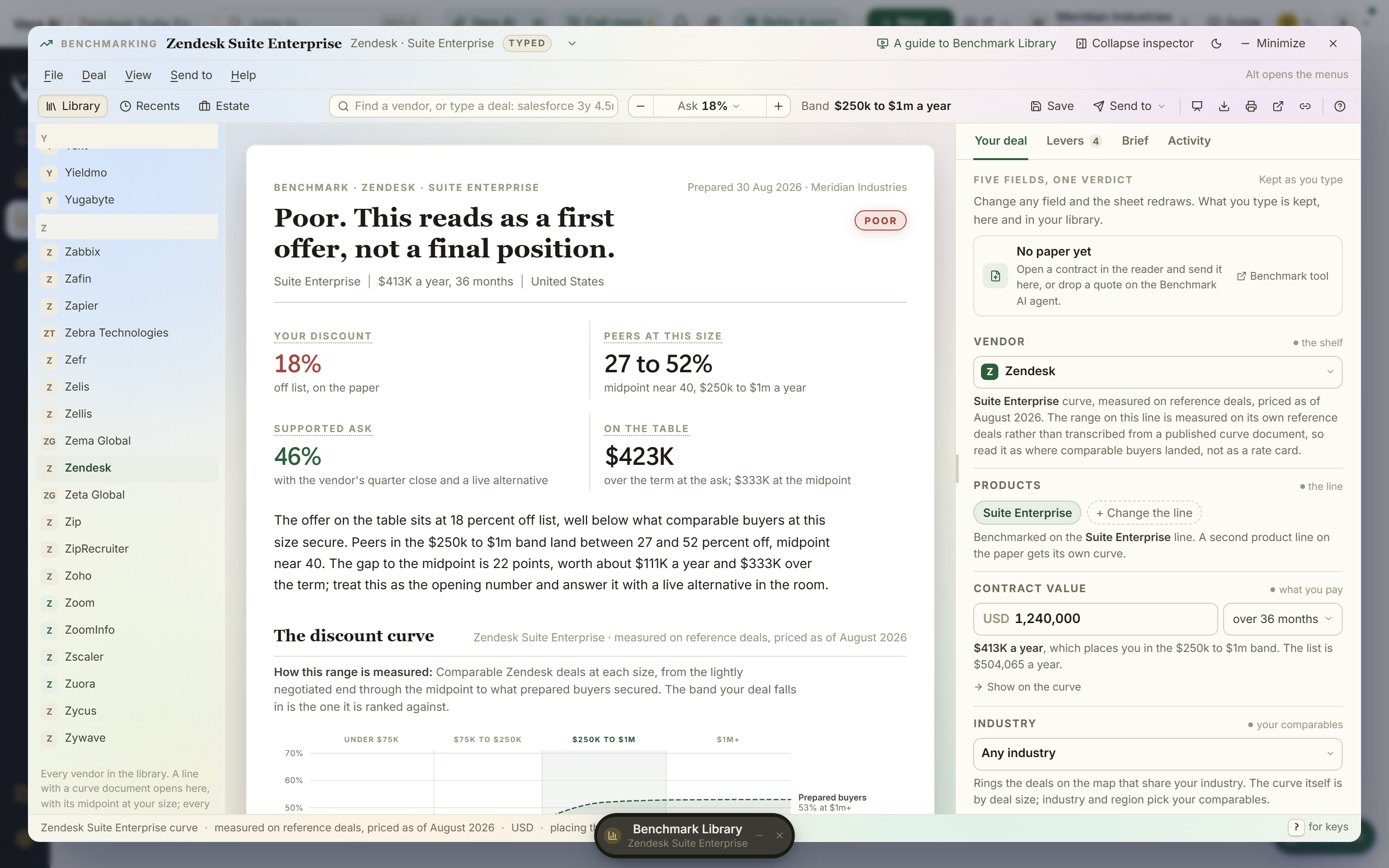
Type a whole deal into the find field and the sheet answers it. Enter something like salesforce 3y 4.5m at 24 and you get the verdict for that shape without saving anything first. This is the same instinct as being able to, on a call, find out if the number is any good before the vendor finishes the sentence.
The last move is a Head to head section on the sheet. It holds any second vendor's documented band against yours at the same size, with the gap priced on your list. When two vendors are bidding the same scope, you no longer compare two separate readings in your head. The band sits next to the band, the difference is stated in dollars against the size you actually plan to buy, and the argument is on one surface.
A typed offer admits it is typed
There is a discipline point buried in this release that matters more than the poster mode. When you type a deal into the find field, the answer now states its own sensitivity: three points either side of the figure. A typed offer is a working baseline, not a signed contract, and a working baseline should never present itself with the false confidence of the paper. By showing the band around a typed number, the sheet keeps you honest about how much of that verdict is firm and how much is your own assumption about size, term, or timing. This is the same principle behind the way the benchmark verdict argues your side in both directions: the tool should not flatter your position more than the evidence allows.
What changes for the buyer
Honest limits
Be clear about what this does not do. The estate sheet reprices positions you have already saved. It does not go and find renewals you never benchmarked; if a line is not in your book, it is not in the sheet, and the ranking is only as complete as your discipline in saving positions. The Head to head section needs a second vendor's documented band to exist. Where a competitor has thin or no coverage in our data, the comparison narrows or is unavailable, and no amount of layout fixes a gap in the underlying evidence.
The typed deal answers the shape you type. Get the term or the size wrong and the verdict answers the wrong question with a straight face, which is exactly why the sensitivity band is there and why you should read it. Dollars still open is an estimate priced against a curve, not a promise the vendor will move that far; the market curve tells you what comparable buyers achieved, not what this particular account manager is authorised to concede this quarter. And when the market moves after you save a position, the estate sheet reprices it the next time you open it, but it is not a monitor. If you want the desk to tell you when a saved deal drifts, that is a different tool, and it is the job we built benchmark alerts to do. Read this feature for what it is: your whole book, priced against today, ranked by what is still worth fighting for, on the surface you already open every morning. See how it fits on the benchmarking page.
Fredrik has spent more than twenty years in enterprise software, with time at Oracle, IBM, SAP, and Salesforce before moving to the buy side. He structured and priced the kind of large agreements most buyers only see once or twice in a career, which taught him where the leverage sits and how far a vendor will actually move. He started VendorBenchmark to hand that knowledge to every sourcing team.